|
Table of Contents |
Seting Probe Parameters
| Probe tools are used to setup statistic
variables interested you. Although a simulation model may write values
during the simulation for each variable, these values are not shown in
the Analysis tool unless a corresponding probe
has been defined.
When you click the There are eight types of probes, but we only use the Node
Statistic Probe in our model. This type of probe is used for recording
dynamic collections of numeric measurements of a particular node. you can
click |
 |
| Right-click a probe in the Probe Workspace to configure its attributes. You can setup the name of the probe, its subnet number, node number, process name and the statistic index you specified in the source code. The lower part network structure and node hierarchy can help you setup these fields. In our models, all probes' "vector data" were enabled. Vector data is a series of entries, where each entry is a time-value pair. This representation shows you how a statistic of interest varies over time. The "vector start" and "vector stop" define the simulation time interval to collect the vector data. By default, the interval corresponds to the entire simulation. | 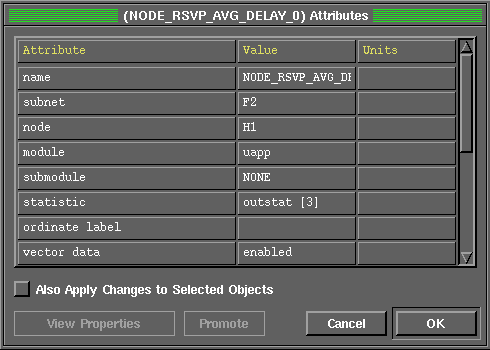 |
In addition to setup the probes in the probe tool, you should write a block of code in the source file, to write the values of probes and corresponding simulation time to the probe file (extension .ov). This operation can be fulfilled by calling op_stat_local_write function, which is provided by OPNET standard function library. Here is an example:
#define Node_RSVP_AVG_DELAY 3 // Index of statistic probe
 to save your work. Run your simulation by typing
|
Table of Contents |
 button, an empty probe window will pop up in the workspace. You can either
add new probe items or click
button, an empty probe window will pop up in the workspace. You can either
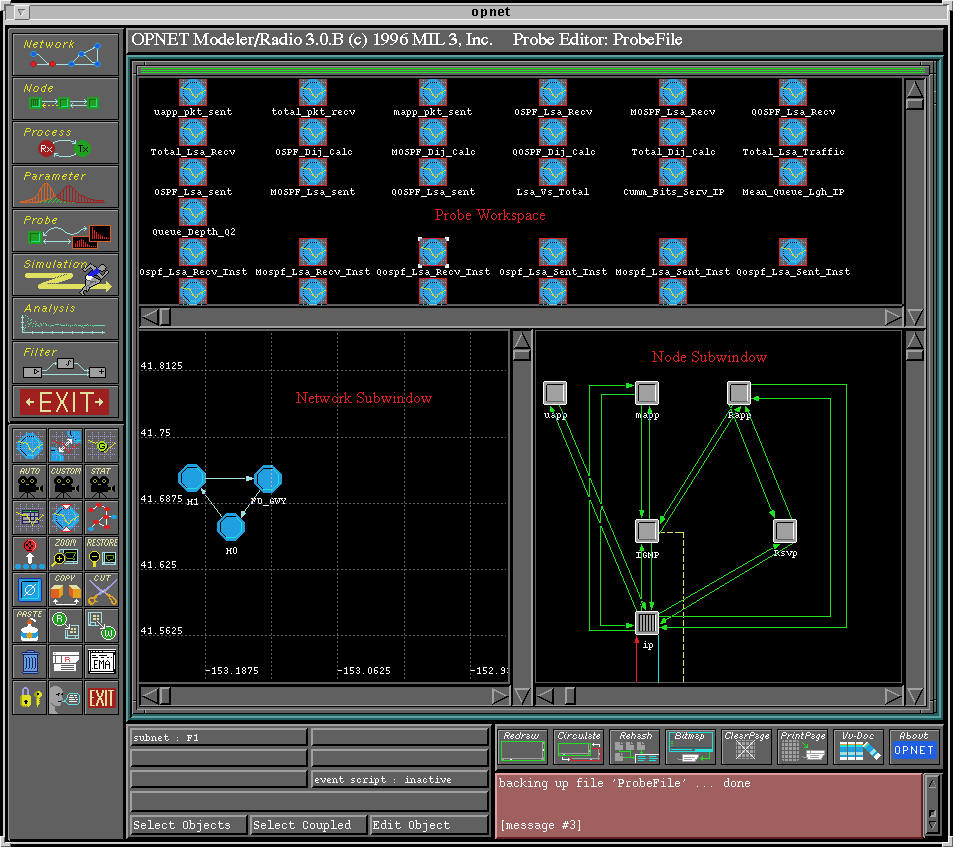
add new probe items or click  to open an existing probe file. After you open our probe file for the DebugModel
(named ProbeFile), the workspace will look like
to open an existing probe file. After you open our probe file for the DebugModel
(named ProbeFile), the workspace will look like  to add a new Node Statistic Probe.