


|
Table of Contents |
Analyzing Results
After simulation is over, Click  to check the output results. The output file contains the data selected
by user in Probe Tool.
to check the output results. The output file contains the data selected
by user in Probe Tool.
There are two principal forms of data, vector data and scalar
data. Output file of vector data have a ".ov" extension, while scalar
data are named with a ".os" extension. A vector is a data set that records
the changing values of a statistic over time. A scalar is to capture non-dynamic
performance measurement of the simulation system. We have only defined
vector data in our model. Click |
 |
 ,
OPNET will show only one curve in a panel; when you click
,
OPNET will show only one curve in a panel; when you click  ,
OPNET can display several curves together in the same window. If you are
going to compare the values of different probes, the second feature will
be very helpful.
,
OPNET can display several curves together in the same window. If you are
going to compare the values of different probes, the second feature will
be very helpful.
Click one of these two buttons, a list of probes will be displayed on the workspace. Each probe is expressed by it node name, process name and statistic index. You have to go back to the source file to find the meaning of the index. You can add more meaningful labels on the graph (see below).

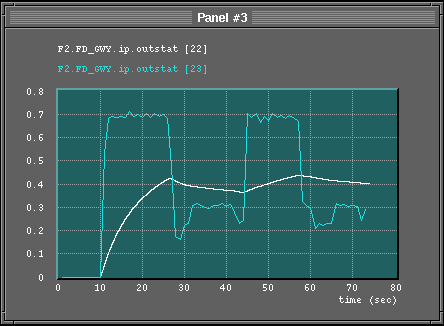
After selecting the probes, use the mouse to set
the position and size of the graph panel. A new panel will pop up on the
workspace (upper picture on the left). Right-click
the window to change the method of drawing each curve (right picture),
including curve labels, colors, drawing styles (simple-hold, bar, discrete
and linear), axis bounds, panel label and panel size. The lower picture
on the left is the refined curve.
 |
 |
 to clear the system buffer. Make sure there is only one window on the workspace,
otherwise, OPNET will print the images of all windows together. Then, click
to clear the system buffer. Make sure there is only one window on the workspace,
otherwise, OPNET will print the images of all windows together. Then, click  to get a printout. You will be asked to set the print area and print direction.
 |
Table of Contents |
 ,
OPNET will pop up a list of available vector files. Select the vector file
interested you.
,
OPNET will pop up a list of available vector files. Select the vector file
interested you.